Some flows are solution-aware, and some flows are not:
https://docs.microsoft.com/en-us/flow/overview-solution-flows
It turned out the difference between those two is not just that solution-aware flows are portable – somehow, it goes deeper.
Just a few days ago wrote a post where I was trying to summarize error monitoring options for the Flows:
https://www.itaintboring.com/dynamics/microsoft-flow-monitoring/
It was not working out quite well there since the main problem I was having is that, for the Flows I was looking at, I could not get the history of Flow runs unless the Flows were shared with me.
However, that’s only a problem for the non-solution aware Flows.
If a Flow is created in the solution, it’s all getting much better.
Through the solution, I can open Flow Analytics for any Flow that’s been added to the solution:
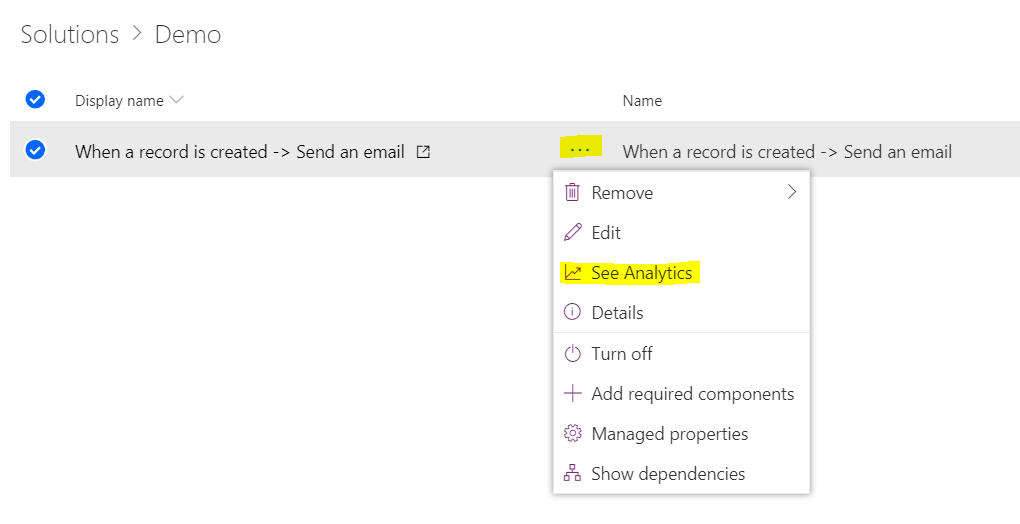
Magically, PowerShell starts showing Flow Runs history for those flows, too:

Of course one possible problem here is that we can’t add non-solution aware flow to a solution, but that’s probably going to be resolved this way or another at some point. Right now, though, if you are looking into Flows portability and/or some kind of error monitoring approach, don’t make the mistake I did and make sure you are working with the solution-aware flows.
PS. In order for the analytics/powershell to work, we do need to have System Admin or System Customizer permissions in the CDS environment.
‘Solution-aware’ / ‘solution-enabled’ flows seem the way to go.
Which I unfortunately realized after building out regular flows.
Thankfully, this piece of gem from @rajyraman helps to convert non-solution aware flows into solution-aware flows.
https://dreamingincrm.com/2019/03/01/flowception-creating-solution-enabled-flow-with-flow/
That link might be very helpful! We don’t have that many flows yet, but, of course, we’ve created them as regular flows. And I hate suggesting to re-create them (even though it’s probably not going to take long).
Do you also see that the “See Analysics” option is disabled when the Flow is in a managed solution? That’s the case I am having at the moment, so still much room for improvement. Haven’t tried the PowerShell option though.
Thanks for pointing this out. And yes, it’s the same for me – looks like pretty much all the options are disabled while on the “managed solution” screen. Although, once I’m on the flow screen, I can, then, see analytics / edit the flow / turn it on and off. It works with PowerShell, too.
How do you get to the “flows screen” you speak of…..When I go to My Flows screen, it is EMPTY even though I’m the owner. I assume its because I’m on Prod, its in a managed solution? When I go to the solution itself, the See Analytics is disabled….so…….How they heck am I supposed to manage Solution-Aware Flows???????????????????????
“Although, once I’m on the flow screen, I can, then, see analytics / edit the flow / turn it on and off. It works with PowerShell, too.
Hi,
I’m having the same issue with a managed solution – can you outline how to get to the flow screen?
Great article, thanks
Steve.